Are you looking for a Binom coupon code?
Use coupon code ERIK40 and get 30 days FREE TRIAL and 40% DISCOUNT in your first paid month!
 Intro
Trackers are a hot topic recently between affiliates and performance marketers. The reason is that one of the top players decided to radically raise their prices, which outraged many of affiliates.
The good news is that in 2018 there are plenty of choices when it comes to our tracking solutions – both cloud and self-hosted.
In the last couple of days I took a closer look at Binom, a self-hosted tracker aimed for professionals, which is getting recently A LOT of traction between affiliates.
Let’s try to find out WHY is it happening and what Binom has to offer to us!

Installation
Binom is self-hosted, which means you will have to install it on your own dedicated or VPS server.
If you are not very technical and not much into managing servers it may sound like a big NO for you, but HOLD ON for a while as I might have good news for you..
There are 2 easy ways to get up and running Binom without the need to know anything much about servers:
- ask Binom support to setup & install the tracker for you
- use their auto-installer
Both ways are pretty good choices. If you go with the auto-installer way, everything is well described with screenshots in Binom documentation (which I highly recommend to read, you will discover all the cool features and how to use them).
For my testing purposes I went with a DigitalOcean VPS with 3GB RAM and 1vCPU which costed me $15/month. According to Binom documentation this should be enough to drive up to 200k clicks a day through the tracker. They got recommendations based on amount of clicks you plan to have.
The DO VPS droplet was created under 60 seconds, I logged into server through SSH and pasted the download and auto-install command. It took around 10 minutes to install and I was up and running with Binom.
Through installation I was asked questions like my timezone, my domain name and folder where I want to install the tracker.
Now here comes the good part! If you have already pointed your domain to your server (using DNS) then during installation you will automatically get your free SSL certificate installed!
If you haven’t done so yet, no problem, it’s possible to enable SSL later directly from the tracker interface.
Updating Binom
While I was testing Binom for couple of weeks, recently there was a notification in the menu about an update.
The new version 1.11 GDPR was just released, which I’m glad as I could see how does the update process looks & works in Binom.
The update itself went on very smoothly, I think it took up to 1 minute and it was done. It downloaded couple of files and there was an animated progress bar informing about the process.
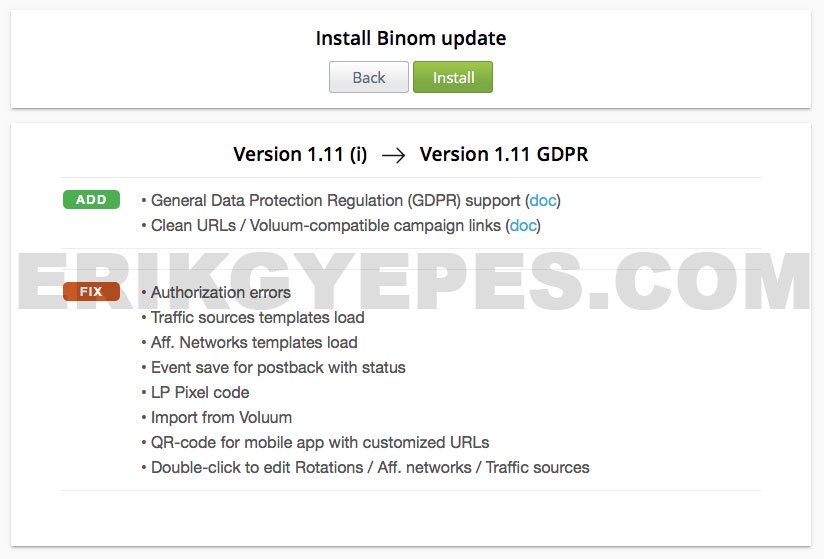
Binom Update
First impressions

Binom Login Screen
Once the tracker was installed I opened it in the browser and was welcomed with a login screen.
The screen with a login window in the middle and a blurred background with campaigns behind it. These campaigns are just fake auto-generated data, but I find it cool. ?
I remember I that I have seen this screen a while ago when I was doing some spying with Adplexity. At that time I thought that I have just discovered someone else’s campaigns. ? Looks cool indeed!
After login I went directly to change my password (which was autogenerated) and started clicking through all the settings to get myself familiar with the tracker.

Binom Campaigns Screen
I then started adding traffic sources, affiliate networks, offers, landers and created my first campaigns.

Binom Campaign Creation
During this process I’ve found some cool features and differences to my current tracker which is Voluum.
Just to let you guys know, I use Voluum for 4 years as my main tracker. I think it’s understandable and make sense that I will tend to compare Binom with Voluum a lot. I think thanks to this I am able to pin-point features that may not be visible on the first sight and that is what a review is about in the first point, right?
Moving from Voluum?
For someone like me who is a Voluum user for years, moving to a new tracker brings additional worries – what about my existing campaigns, how fast I will be able to move?
There are 2 main paths that you can take:
- start launching new campaigns in your new tracker (in this case Binom)
- use the Import from Voluum feature in BInom
Launching new campaigns in your new tracker
This is rather a manual and slower move by simply launching new campaigns in Binom. Your old campaign will still stay in your old tracker solution and as time goes and campaigns die (they always do at some point!) you will have everything in your new tracker.
Import from Voluum
Binom offers import from Voluum function which you can find in the settings under Import/Export tab.
To start the import process you need to enter your Voluum login and password. In the background Binom connects to Voluum through their API and fetches all your campaigns, landers, offers, affiliate networks and traffic sources.

Binom Voluum Import
If you need to import just a couple of landers you can do that separately on the Landings tab, but the real power of import lies in importing the whole campaigns.
When you import the whole campaign, all it’s landing pages and offers will be imported as well and even your funnel/flow will be built in Binom same as it was in Voluum, which is nice.
Clean URL
After I’ve updated to the latest version of Binom, there was a new feature released called – Clean URLs.
With this feature you can rename your campaign URLs as you’d like.
Your campaign URL can easily become https://trackingdomain.com/my-custom-campaign-url. The reason I’m mentioning this feature here is that this could be handy when your are moving from another tracker and you don’t want to edit your campaigns on traffic sources and wait again for re-approvals. You could simply make the URL look same as in your previous tracker.
This is also nice to have if you want to hide your campaign URL behind a nice user (or SEO) friendly URL without need to doing it manually in server’s .htaccess file.
Usage & Features
I went ahead and started running some traffic with Binom right away. Here are some interesting features I found and tried while I was setting everything up:
So first I went to add affiliate networks. There was already a catalog of existing networks categorized by verticals, main geo and even their ratings. This is similar to templates in Voluum and it’s good to see it here as well as it’s a huge time saver when setting up things in the beginning.
There is also a similar catalog for traffic sources, what is interesting they also note if the source has a self-serve or no.
Now the more interesting part are landers.
There are 2 big features I didn’t see in Voluum:
- Integrated (no-redirect) landing pages
- Landing page protection
Let’s take a look at both of these features in detail:
Integrated (no-redirect) landing pages
With integrated landing pages you upload your lander to the tracker and use a special token as your CTA click link. On the traffic source side you will link to your campaign with campaign tracking link as usually, with one difference – there will be no extra redirect as Binom will load the landing page directly.
It’s kinda similar to direct pixel tracking (which Binom and Voluum both support), but difference is that with integrated landing pages the landing page itself is located on the same server as you tracker, whereas with pixel tracking you can host your landing page on another server or CDN.
Lander Protection
This is an easy concept of protecting your landing pages from accessing them directly by someone who knows their URL.
All you have to do is copy a single line of PHP and paste it in your landing page code. In tracker you pass a special token with key valid for this landing page.
Your IP, User Agent and time that has passed since your last visit will be checked against the key and if there is no match you won’t see the landing page.
Basically you can access it only with campaign tracking link, but not directly.
I think though it’s still not 100% going to protect you as spy tools like Adplexity will get your landing page as they follow the campaign link and then eventually save your landing page anyway.
Smart Rotations
Another interesting feature I totally love in Binom are smart rotations.
How smart they are?
Well, the concept behind them is to not show the same part of the funnel (ie. lander and offer) to the same user again if he’ve already seen it.
Imagine that you are split testing 3 landers: On first click the visitor will be redirected to lander #1, but if he clicks your ads again he will be sent to another landing page (#2) in the rotation. Then if he comes one more time he will see the last lander (#3) and if he still keeps coming back the tracker will start to rotate those landers from start. The same is true for offers.
More practical use I can see with back button redirect script, where each time the visitor hits back button, he will see a different offer. Totally automated by tracker, with no additional coding needed.
You still can use the standard (random) rotations, all these options are available when you creating a new campaign.
E-commerce and Subscriptions
If you’ve ever run COD (cash on delivery) offers, you know there are usually 3 states of a conversion: HOLD, REJECT and LEAD. I personally like to keep track of all the 3 states and in Voluum I use custom conversions for this to work.
In Binom it’s called E-commerce scheme and it’s accessible in the Settings panel. It works without problems, only difference is that in Voluum each conversions is tracked as a separate conversion. What I mean is that when you get a HOLD and it changes into a LEAD you will see 2 conversion events in Voluum. One for HOLD and one for LEAD.
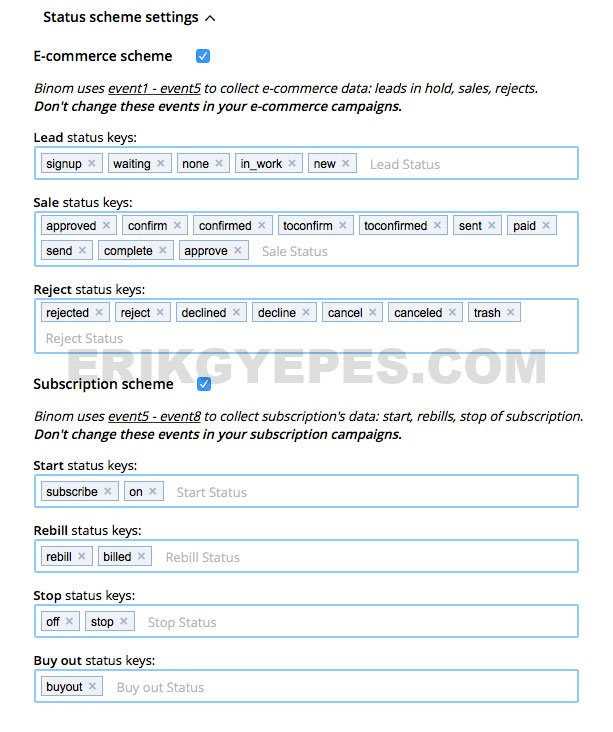
Binom Ecommerce Scheme Settings
In Binom you will see only 1 event. How it works is that if HOLD changes to LEAD then what happens is that the previous conversion in the HOLD state changes its status to LEAD and that’s it, no additional conversion event is created.
While I like this approach as it’s more “clean”, I kinda lost track of which holds changed their statuses. They simply change status and there is no way to see where it happened as their conversion time is not updated.
I would like to have it more clear as I totally love to have everything under control.
What is nice though is that I can see how long does each conversion take – from time the user clicked, until the time the user converted.
Thanks to that I can see how long does it usually take for people to go through the funnel.
I don’t understand why Voluum doesn’t show this information in this more human readable form as well (they show only visit and conversion timestamps).
You can also set conversion statuses for upsells or subscriptions if you are working with these kind of events.
Estimated Approval, Profit and ROI
Another aspect of running COD offers is that you never have 100% approval rate. In a high approval geo you can get to let’s say 60% which is awesome, but forget about 100%. This leads to a minor issue while tracking:
The problem is that it’s harder to see your numbers as traffic keeps coming, spend is going up and conversions takes time to come in as they all depend on call center overload.
Here comes very handy the EA – Estimated Approval Rate in Binom. In your campaign settings you can set the expected approval percentage. After that you can enable columns E. Profit and E. ROI which stands for Expected Profit and Expected ROI.
This way you can see how are you standing at the end once the expected holds will be approved/rejected. Thanks to this you can see in early stages of your campaign if you are doing well or no.
Very helpful indeed!
Domains check for Google blocking
This has been an issue for a while for many affiliates. I also wrote about this topic in the past.
Binom now integrates with Google Safe Browsing API and let you check how are your domains standing. So far it’s all manual, so you have to click manually to check your domains.
Hopefully they will take this feature even further and will add automatic checks with email notifications, which would then completely replace my custom system I created myself a while ago for the exact same issue.
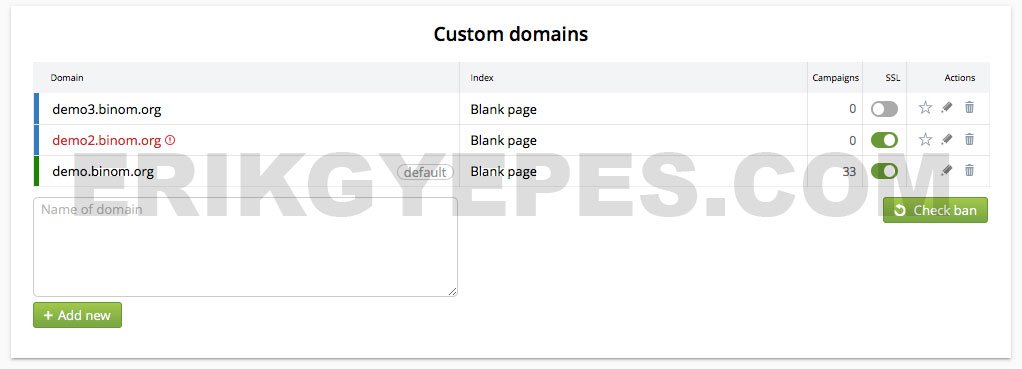
Binom Custom Domains Management & Google Block Check
Free SSL certificates
As I already mentioned, Binom can enable SSL for you by default for the tracker as whole. However it can also enable SSL for any additional (custom) tracking domain you will add later. You can do it simply by clicking on the enable button next to the domain.
That’s it and it’s free!
Honestly, shame for Voluum that with their current pricing strategy they charge for SSL, and also that for having SSL enabled we have to contact their support.
In Binom you can do it yourself in a matter of seconds without waiting for support to manage it for you.
And as I said, I do not see any sense in charging people for SSL certificates when you can get them for free these days and it’s a mandatory element in todays internet.
Notes
There was a thread a while ago on STM Forum where someone asked how do we track the changes we made to our campaigns.
I personally have a custom Evernote notebook with notes for each campaign, but honestly I didn’t use it lately so often.
In Binom you can add notes on separate levels – Campaigns, Landers and Offers. Very handy and helpful as there is no need for any external systems.
Everything stays in tracker where it’s just a click away to see.
Marking Rows & Filters

Binom Profitable Zones Marked & Filtered
Marks are useful when you working on your campaign optimisation.
You can assign different marks to publisher/zone IDs and then easily filter on them.
There also very powerful filters, you can basically filter on any existing column and use multiple conditions to get the data that you need.
You can save these filters as templates, so you can quickly reuse them in the future.
Let’s say you want to find all zones that have ROI less than -25% and have spent more than $10. You can mark these with “minus mark” and export them to clipboard so you can immediately block them at the traffic source.
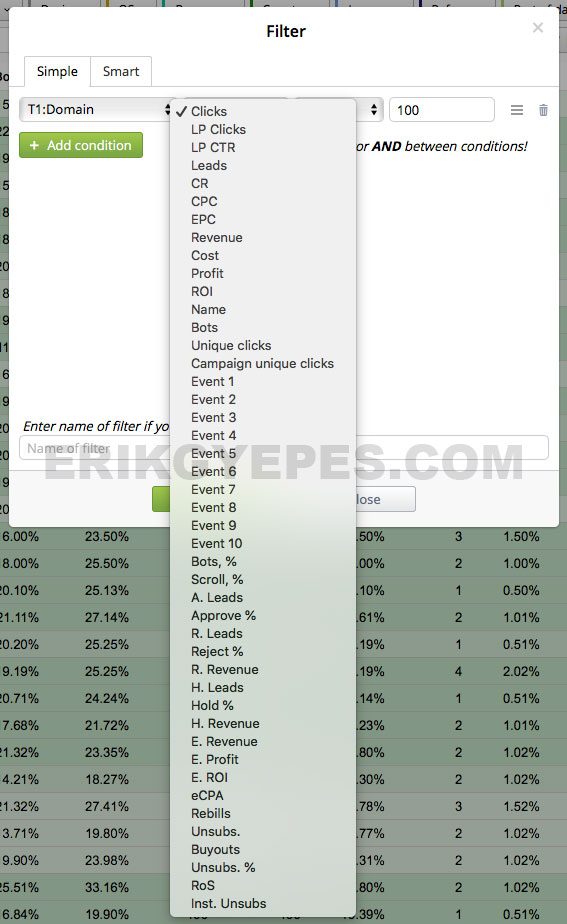
Binom Token Filter Options
Info & Monitoring
If you are like me or any other affiliate you’ve probably spent a good amount of your day with hitting REFRESH button and visiting the Conversions tab in your tracker. ?
Not only that it’s addictive, but we also like to keep track if things are as they should be – ie. if the traffic and conversions are coming as they should.
This why I really enjoy to use the “Info” view for campaigns in Binom. When you click on the Info button, instead of seeing Visits, Clicks, Conversion, Profit, ROI and all the usual columns you will be presented with useful information for each campaign.
There will be new columns that you’ve probably never heard of and I had to dig into documentation myself to find out what they mean, but once I did I was impressed how useful they are:
- CLH – Click per Last Hour
- LLH – Leads (conversions) per Last Hour
- PLH – Profit per Last Hour
- Last Lead – Time since your last conversion
With this info you can easily see how much is each of your campaigns making per last hour or when was the last conversion. IMO much easier to spot if something went wrong.
There is also a Monitor tab in Binom where you can see graph of incoming clicks, with it you can also easily detect if there has been a significant drop in traffic.
Besides that you can see the current load of your server and other technical details about your server.
Advanced features
What I like about Binom is that it’s very user friendly from the outside and at the same time it offers many advanced features for the pros.
These features are hidden in the documentation and that’s another reason to grab a coffee and read through it!
Custom Columns
One example are custom columns.
They allow you to add your own columns if you need additional calculations. They are especially useful with the Events feature, that I’m going to describe just below.
With custom columns you can enter your own formulas and let Binom to calculate them for you. No more need for exports to Excel to do additional calculations there.
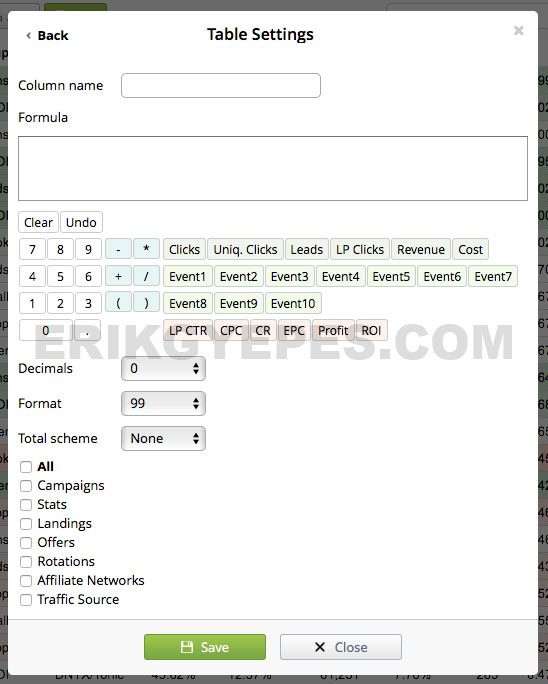
Binom Custom Columns
Events
In Binom you have 10 events variables that you can use for your advantage.
Thanks to these you can do fancy stuff like measure scroll % on your landing page or find bots visiting your LP.
To make this work you have to use special JavaScript (examples are in the docs) that will do the required measurements and report back to tracker.
The reported numbers will be assigned to event variable and to take this to another level you can create custom columns to do further calculations like create a new column with scroll % for each placement.
Tracking Exit Points
Let’s say you have landing page with multiple CTA’s. There could be a CTA link somewhere in the text, maybe also in sidebar and then there is also a big CTA button on the bottom.
You may wonder which one had the visitor clicked the most?
Usually you need third party trackers for tasks like these, but why to not have it right in the tracker?
With Binom it’s possible.
You have to add special “&place=” variable to the CTA link and after that you will find all this information tracked in Binom.
Another features
Honestly there is many more to Binom that I could fit into this review, which is already quite long.
Here is a list of some other features that Binom offers:
- Unlimited additional users with custom access permissions (and hide profit feature :))
- Complete clicklog
- Redirect Rules
- Rotations
- Import/Export features (also import campaigns from Voluum)
- Groups
- Smart meta refresh
- Custom domain for each campaign
- Anti-Spy feature
- Clickloss feature
- Multivariate Testing (MVT)
- Event System
- Tracking Exit Points
- Campaign Cost Update
- LP Pixel
- Mobile apps (here Voluum still wins though, their apps is much much better)
- Trends with charts to easily see your daily performance across all campaigns
- Multiple currencies for offer payouts
- Marks
- Hotkeys (Keyboard Shortcuts)
- and many more…
Pricing & Live Demo
Binom is priced at $99/month with a monthly plan or $69/month if you choose their yearly plan.
Additional license (for example if you want to install your tracker in multiple geo locations) comes with a price of $49.
There is also a free 31-days trial, so you can try out the tracker on your servers completely free.
The support for Binom with any plan is free. From my experience and experience of others on STM their support is really nice and fast. You can communicate with support directly on Skype, without need of placing any support tickets.
Binom also offers a live demo, so you can play and test the tracker without installation on your own servers.
What about a coupon code?
Glad that you asked! I got in touch with Binom’s team and managed to get a COUPON CODE for my blog readers! Especially those few that made it until here ?.
When you sign-up for Binom, use coupon ERIK40 and get 30 days FREE TRIAL and 40% discount on your first paid month!
This should give you plenty of time to properly test Binom and move your campaigns over.
Conclusion
Honestly I’m very surprised how well is Binom done.
Many affiliates are afraid of self-hosted solutions as they are used to that proclaimed fast redirect speed in distributed cloud and afraid of click loss and hassle of taking care of their own servers.
I think it’s not of a big deal these days. Binom has great support and installation optimised server for tracker is not difficult at all.
And if you are very concerned about redirect speeds you still can host your tracker in multiple geo locations with additional licenses (which come at cheaper rate as the main license).
But unless you run pop traffic heavily in countries with slow internet speeds and high click loss I would not worry about this issue as much.
On the other side if you run Facebook, Native or display traffic I would not worry at all. Plus you can use the LP Pixel or integrated landing pages which can save you another redirect.
So overall I think Binom is a really solid product.
In some areas and features it offers I would say Binom is more oriented towards affiliates than Voluum these days. Voluum starts to position themselves as an enterprise solution for bigger brands and therefore appeal to other types of customers.
Let me know what do you think in the comments below! Which tracker do you use these days and why did you choose it?
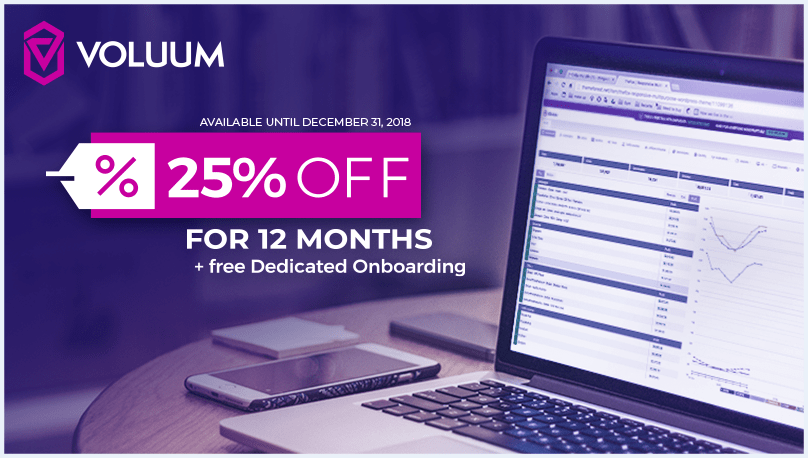
]]>Voluum now offers 25% discount until 31st of December 2018.
Intro
Properly understanding tracking in affiliate marketing can be a tough problem if you’re just starting out and are about to launch your first campaign.
There are too many small things that need to be done before everything works as a well-oiled machine.
Don’t worry, though.
After reading this guide, you will be able to set up everything by yourself and enjoy all the great features that trackers offer.
What is tracking?
When I heard about tracking for the first time (back in 2012), my mind was totally blown.
I was browsing through some affiliate forums similar to STM forum and some guy posted a screenshot of his earnings.
He was able to track his profits, costs, and conversions in real-time.
I remember that there were also many other reports and analytics that could show more information about his campaigns.
What?
The only “tracker” or “analytics” tool I had seen until this time was Google Analytics, and I thought that was the king of all “tracking”.
So you can see it was a totally new concept to me at that time, and it also may be to you if you are just switching to paid traffic affiliate marketing (I was doing SEO before).
Anyhow… let’s get back to the main question: What is tracking?
Tracking is the process of monitoring everything that goes on with your campaign, and the software that we use to do so are called trackers.
The tracking process usually works like this:
- You buy traffic from a traffic source
- You send it to your tracker
- The tracker sends your visitors to your landing page or offer
All of the magic happens in Step 2.
The tracker notes all of the information that your traffic source is sending to it. That information varies from source to source and also from your setup, but it could be something like this:
- the source of traffic (i.e. placement or zone)
- the category of that source (i.e. Entertainment, Education, Business)
- the banner that was clicked
- the cost of the click
It also saves all visitors’ information, like:
- country, region, or city
- device and device type
- mobile brand and model
- operating system and its version
- browser and its version
- IP address
- ISP, connection type, and mobile carrier
- referrer
- language
- etc.
Suddenly, from that 1 visit that hit your tracker, you extracted all of this useful information.
You will also know which landing page they landed on if they clicked through and, most importantly, whether they converted or not.
Besides that, you can work some magic on your own.
You can set up your own rules and decide how you want your traffic to flow.
Example: Imagine you launched a campaign in Malaysia. In Malaysia, there are at least 3 languages spoken: English, Malay, and Chinese, among others.
So what you can do is create 3 landing pages for each of these languages and set your tracker to send visitors to the appropriate landing page based on their browser settings (Voluum detects this automatically for you).
Other important metrics that trackers will show you include:
- visits
- clicks
- profits
- costs
- conversions
- landing page CTRs
- conversion rates
- ROI
- EPC
- and many others
Now you should have a better understanding of what a tracker is and why it is so important to performance affiliate marketers.
Without using proper tracking software, you don’t really know what’s going on with your campaigns — you are just throwing shit against the wall to see if it sticks.
Next: There are 2 big groups that differentiate trackers: self-hosted and cloud-hosted. Let’s talk a bit about that.
Self-hosted vs cloud-hosted trackers
Before you choose your tracker, you have to decide between self-hosted or cloud-hosted trackers.
Self-hosted tracker
As its name suggests, self-hosted trackers are hosted on your own servers.
That means you will have to purchase your own VPS or Dedicated Server.
That is an additional cost on top of the cost of the tracker.
You also need to have a good understanding of server administration or hire a professional to do it for you.
These are things you need to consider when you choose the self-hosted tracker route:
- hosting and its maintenance and costs
- maintaining the tracker (installing updates)
- monitoring servers (so you can control your traffic if your server fails)
Cloud-hosted tracker
Cloud-hosted trackers, on the other hand, are hosted in the cloud.
That means that you don’t need additional hosting for your tracker (but you will still need hosting for your landing pages).
The technical aspect of the tracker is taken care of for you.
All you have to do is log in to your tracker interface and do your work.
I personally prefer cloud-based trackers or at least trackers that offer managed service, as I don’t like to deal with the technical side of them (even though I’m good with servers).
I couldn’t sleep well with the idea that I’m sending hundreds of thousands of visits to my tracker and it could fail overnight.
Imagine the sudden loss it could create in just a few minutes.
So having a good tracker with top-notch tech behind it is a must.
Next: Let’s cover the most popular trackers that are available on the market nowadays: Voluum, Thrive, FunnelFlux, and AdsBridge.
Trackers on the market: Voluum, Binom, Thrive, FunnelFlux, and AdsBridge
It’s 2017 and there’s no better time for tracker shopping than now.
Just a few years ago when I started, there were only a few trackers with very limited functionalities and they were all self-hosted.
Then Voluum arrived, and the tracker market boomed!
Modern tracker software competitors entered the scene and totally destroyed the old players that were around for years.
I should note that I’m personally using Voluum (I’m very happy with it) and I don’t have experience with the other trackers on the list.
However, I want to keep this guide as honest as possible, so I’m including them in here as well.
Voluum

Voluum has been recently rebranded and they updated their logo (2018)

Voluum’s old logo
Voluum is a cloud-hosted tracker, and it’s the one that totally changed the game.
After it came onto the market, I never heard anyone talking about CPVLab or Prosper202 anymore, which were the top trackers before (I used CPVLab).
They have probably the best infrastructure in the whole tracking industry. Everything is in the cloud, across continents, which means the fastest redirects you can have.
Fast redirects are very important, especially if you are going to run worldwide traffic on mobile.
Faster redirects = less click loss
Voluum has “infinite scalability”, which basically means that they can handle all of your traffic without worrying about server downtimes.
Setup (as you will see below) is very easy, and they have a modern UI that’s pleasant to look at (which is also an important factor, as you will spend hours on your tracker).
Reports are in real-time and you can do amazing things there.
Your can view your campaign from almost “any angle” you wish, and if it’s still not enough, you can do multiple-level drill downs.
On top of that, they have mobile apps for both iOS and Android so that you can monitor your campaigns “in the terrain.”
I especially love the widgets that I can place on my screen in the Android version of the app.
Voluum also has an API, so you can build your extensions or tools on top of it.
Voluum Pricing
Starts at $299/month for the lowest package, which includes 2,000,000 events (visits+clicks+conversions). Voluum doesn’t have free trial at the moment.
Voluum Free Trial
Many people asks if Voluum does have a free trial as most of the other trackers do have it.
When Voluum started out in 2013 they used to be totally free, then they introduced paid packages and still had a free package with 100 000 free events.
Unfortunately these days (September 2018) they do not have a free trial or any other free package option.
Binom

Binom is a self-hosted tracker and is recently getting lot of traction.
It got all the features that Voluum has + many more such as smart rotations, custom columns, e-commerce features, event system, tracking exit points, smart meta refresh and so on.
I recently wrote an in-depth review of Binom and you should really take a look at it, even if you think that self-hosted tracker is not something you are into.
Binom Pricing
Binom costs $99/month (or $69 with a yearly plan) and for additional licenses they charge $49/month. Everything is unlimited and you can have as much events, domains and users as you want.
Binom Free Trial
Binom offers a 31-days free trial. You can also get a free month + 40% discount if you use coupon ERIK40 when you sign up with Binom.
Thrive (now called ThriveTracker)

If I remember right, Thrive was introduced to the market shortly after Voluum, becoming its main rival.
What I like about Thrive is that they offer both self-hosted and cloud-hosted options.
One interesting feature they have is the ability to track your conversions without extra redirects.
It’s done with a special LP pixel that you have to include in your landing page source code.
The benefit of this feature should be clear: less click loss.
They also offer many batch actions (which Voluum doesn’t include), so you can edit multiple offers or landing pages simultaneously or add 100 landing pages through CSV import.
Thrive Pricing
Starts at $99/month for self-hosted service and $299/month for managed cloud-hosted service.
For the self-hosted service, there is also an additional cloaker / bot filter add-on for $59/month and a multi-user access add-on for $79/month, which totals to $237/month.
Learn more about Thrive Tracker here.
Thrive Free Trial
ThriveTracker currently offers 14-days of free trial.
FunnelFlux

FunnelFlux or, as it calls itself, “The Visual Tracker”, is taking a different, yet very original, visual approach.
It’s a self-hosted tracker and its main and best feature is the possibility to create visual funnels.
You build your funnels visually using a visual editor. There is also no need to place any other scripts on your page, and you can build any funnel you can think of.
FunnelFlux can also show you the lifetime value of your leads, has a powerful statistics engine, and tracks 60+ key performance indicators automatically.
FunnelFlux Pricing
Starts at $99/month, but keep in mind that you will also need additional hosting, as FunnelFlux is a self-hosted tracker. The recommended server setup for 200,000-1 million visitors per day is a Vultr server with 8 to 16 CPUs and a minimum of 16GB memory, which falls between $160 and $320/month for server costs.
Learn more about FunnelFlux here.
FunnelFlux Free Trial
FunnelFlux tracker offers a “TestDrive”, which is technically a free trial, it is very limited though as it lasts only 3 days.
AdsBridge

AdsBridge is the new kid on the block.
It’s a cloud-hosted tracker, and a couple of their extra features compared to the other trackers I’ve mentioned is a landing page builder and hosting.
What that means is that you can create or design and host your landing page on AdsBridge servers.
Another feature that got my attention is SMS & Email Alerts that can really come in handy in many cases, and I wish Voluum had it too.
AdsBridge Pricing
Starts from $0/month for a 14-day trial followed by a $75/month package with 1000 000 visits/month.
Learn more about AdsBridge here or read a in depth AdsBridge review from my friend Servando.
AdsBridge Free Trial
AdsBridge offers a 14-days of free trial. It’s basically a hard limited package with 50 000 free events.
This was a short intro to other trackers, but as I said earlier, this tutorial is about using and setting up campaigns in Voluum, which is the tracker that I have the most experience with.
So let’s start!
Switching to Voluum?
If you’re already using another tracker and thinking about switching to Voluum, here is a simple method on how to do it without major pain:
Keep your old campaigns in your old tracker and start your new ones in Voluum.
Easy, right?
Create Your Voluum Account
If you don’t have your own Voluum account yet, you can create it from here.
Once you have your account set up, log in and proceed to the next step:
How to Set Up a Custom Domain in Voluum
One thing that I recommend everyone do before they launch their campaigns is to set up a custom domain.
Voluum by default gives you a free domain of their own, but that might already be banned by traffic sources or flagged by Google or antivirus companies.
Register a domain name

First, you need to register a domain name.
I recommend doing it through NameCheap, as they give you FREE WHOIS Privacy Protection for the 1st year, and they also often have promotions like domains for 80 cents a pop.
To point your new domain to Voluum, you have to set your DNS records.
In Voluum, navigate to Settings -> Domains.
Copy your Voluum domain (there are currently 3 choices — you can copy any of those).
Next, at NameCheap, find your domain and go into its management. Then click on the “Advanced DNS” tab and:
- add a new CNAME record.
- set host to something like “track” (so if you have domain campaigns.com it becomes track.campaigns.com)
- set value to your Voluum domain value that you copied before (ie. qwerty.voluumtrk2.com)
- you can leave TTL at its default value
Save all changes and wait for your new DNS settings to propagate.
I like to monitor it live using a free tool called WhatsMyDns.net; it’s a free global DNS propagation checker.
To check for your changes above, type in your domain (i.e. track.campaigns.com), select CNAME from the select option, and hit search.
The next step is to add this domain to Voluum, so go back to Settings -> Domains and:
- add your own custom domain
- make sure you click “Set as main domain”
- you can also monitor if the DNS is set correctly using the “Verify DNS settings” button
How to Use Tokens and Types of Tokens
Before we talk about adding things to Voluum (by things, I mean landing pages, offers, and so on), let’s talk a bit about tokens.
What is a token?
A token is nothing more than a variable that can hold many different kinds of information, and it can be prepopulated in 2 ways:
- by a traffic source
- by your tracker
Traffic Source Tracking Tokens
Almost all traffic sources these days support tracking tokens. Tracking tokens are dynamic variables that can be assigned to the query string in your URL to send more information back to your tracker.
If you are running mobile pop traffic, the most common token you will have in every source is your placement ID (also called the site ID, zone ID, or simply placement).
Example: Let’s say you are setting up a campaign on PopAds. They’ve got a token for placement called WEBSITEID, so if you set your campaign URL as http://track.campaigns.com/tracking-link?websiteid=#websiteid (#websiteid is the token), it will become http://track.campaigns.com/tracking-link?websiteid=12345.
Tracker URL Tokens
Another type of token is a URL token, provided by your tracker.
That’s another great reason to have a tracker. As I mentioned before, trackers can detect many useful things about your visitors, such as their country or city where they are located.
You can use this information to your advantage and, thanks to URL tokens, you can send and display them on your landing page.
Example: You enter your landing page into your tracker as: http://mylandingpage.com/?brand=#brand&city=#city. Voluum will translate it to: http://mylandingpage.com/?brand=Apple&city=Sydney. Then you just add a simple script on your landing page to display your visitors’ mobile phone brand and the city where they are located. This gives you unlimited possibilities on how to craft the copy for your landing pages!
I hope tokens now make at least a bit more sense to you.
You will use tokens a lot during your affiliate career.
Postbacks and Postback URL
When it comes to tracking conversions, there is the important concept of postbacks that you need to understand.
Postbacks are server-to-server (S2S) calls that enable your affiliate network to notify your tracker that a conversion happened.
Every time a visitor goes through your tracking link, Voluum generates a unique click ID that is then sent to your affiliate network.
If the visitor converts, your affiliate network sends the conversion back by calling your postback url and attaching your unique click ID to it.
Your tracker then thanks to click ID knows to which campaign to assign your conversion.
You can find your postback URL in Voluum by navigating to Settings -> Setup, under “Postback URL”.
Example: http://xyz.voluumtrk2.com/postback?cid=REPLACE&payout=OPTIONAL&txid=OPTIONAL
The most important part of it is cid and payout.
You will have to replace their variables inside your affiliate network system.
Here is how you do it for the Cake system (it’s the one that networks like ClickDealer or Gotzha use):
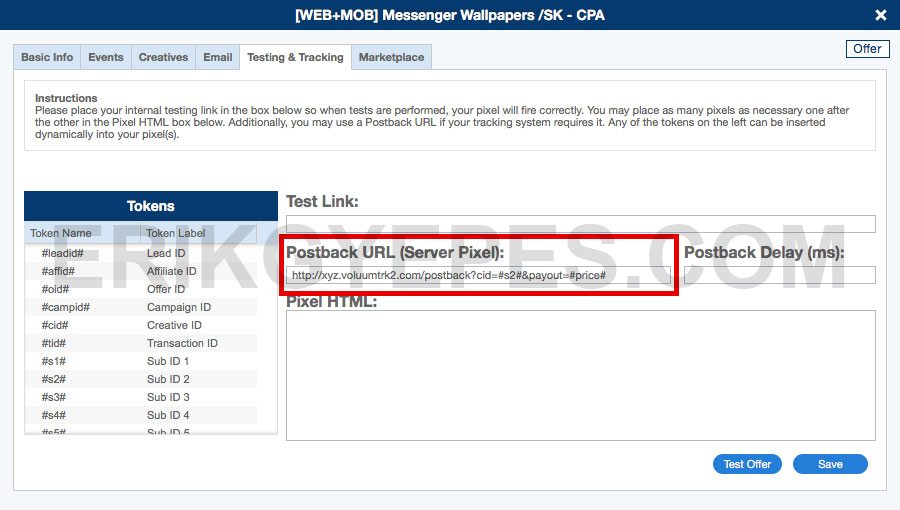
Here is how you do it for the HasOffers system (used by network like AppFlood):
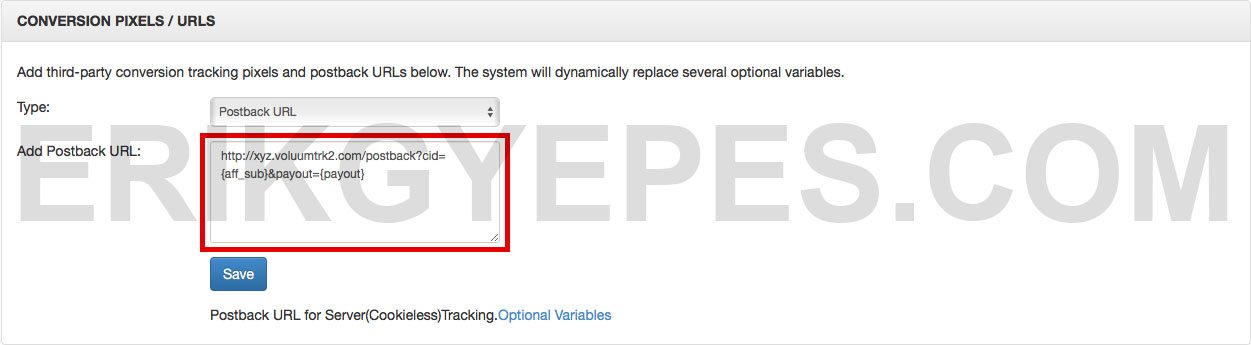
This is maybe the most technical and confusing part of all tracking, but also the most magical one. Thanks to tracking conversions, you will later be able to optimize your campaigns and make more profits!
How to add affiliate networks
One of the first things you are going to add to your tracker is an affiliate network.
The guys at Voluum did a great job of prepopulating it with “trusted affiliate networks”.
Here is how you add a new Affiliate Network in Voluum:
- Navigate to your Affiliate Networks tab.
- Click on the “New affiliate network” button.
- Choose one of the predefined networks or add your own by entering the affiliate network’s name.
- Click “Save”.
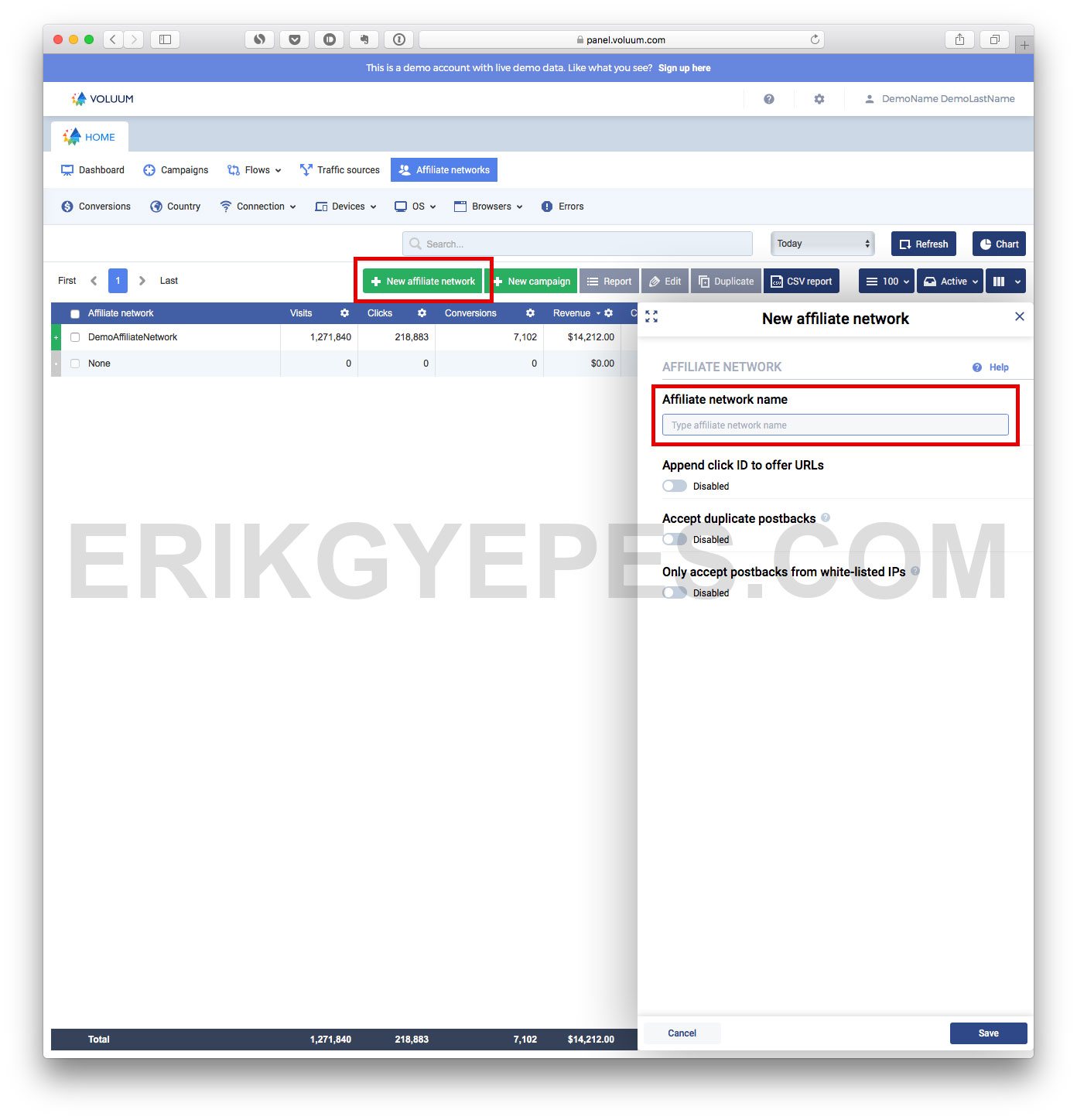
That’s it, you just added your very first affiliate network into a tracker!
How to add traffic sources
Once you’ve added an affiliate network, you need a traffic source.
Here is how you add a new traffic source in Voluum:
- Navigate to the Traffic sources tab.
- Click on the “New traffic source” button.
- Choose from a predefined one or add your own by entering the traffic source’s name.
- You can ignore the Postback URL (this is for sending your conversions back to the traffic source) and other checkboxes below for now.
- Click on “Advanced”. This is where you enter your tokens, and it’s probably a bit confusing if you’re just starting out. That’s why I wrote about tokens initially, so you could understand them better at this point. (See my screenshot and tip below for this step.)
- Click “Save”.
Now about Step 5, entering traffic source tokens: As each traffic source has different tokens, this section will be different every time. The easiest way is to use the predefined traffic sources. If the traffic source is not on the list, I recommend using trackingtokens.com.
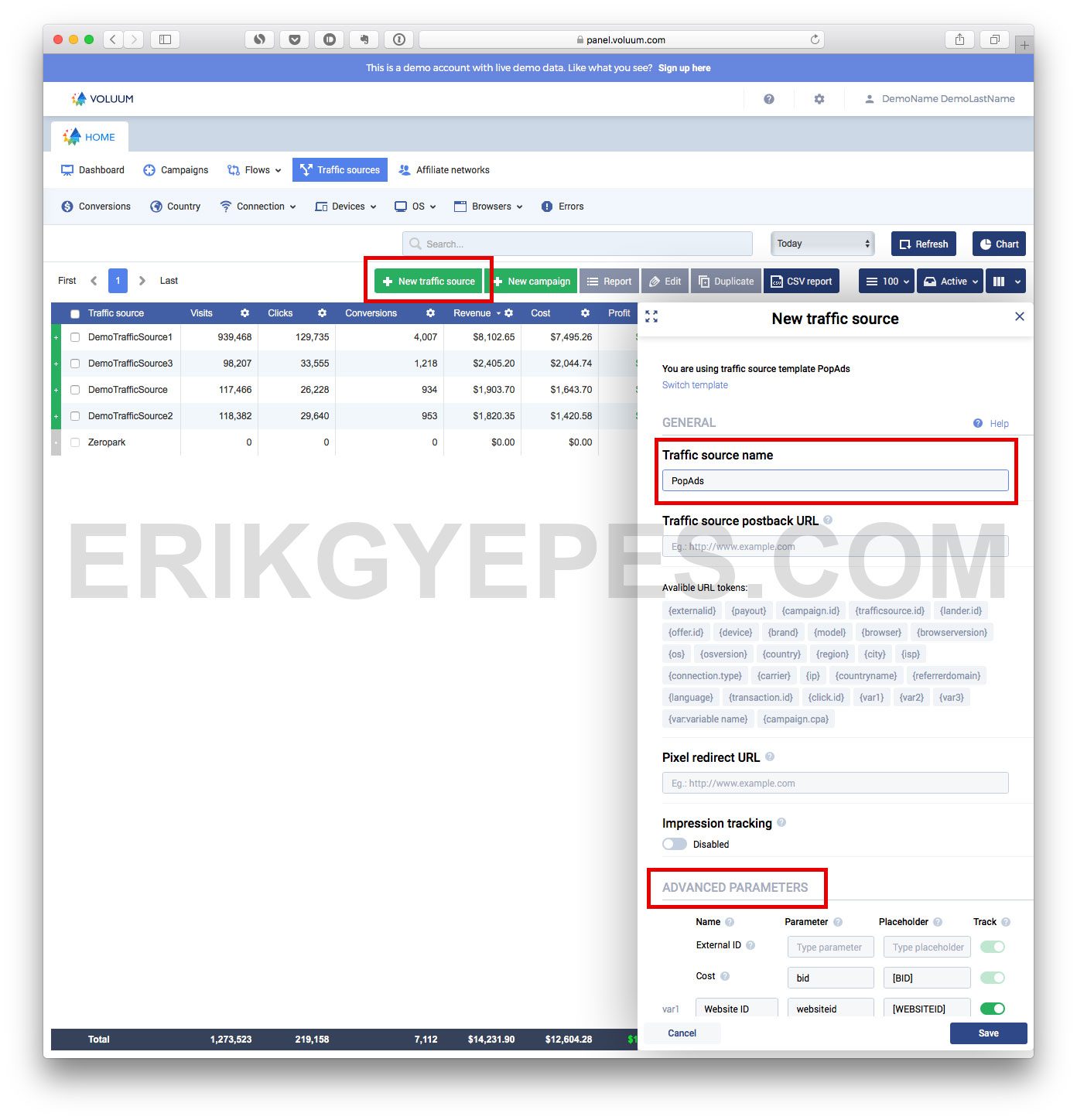
How to add offers
To add an offer, you need to copy your tracking link from your affiliate network.
Here is how you add a new offer in Voluum:
- Navigate to the Flows -> Landers tab.
- Click on “New offer”.
- Enter a descriptive offer name.
- Enter your tracking URL.
- Select the country for your offer (if the offer runs in multiple countries, leave the default option selected).
- Select the affiliate network that the offer belongs to.
- Leave payout on auto (that’s why you need to set up your postback correctly).
- Click “Save”.
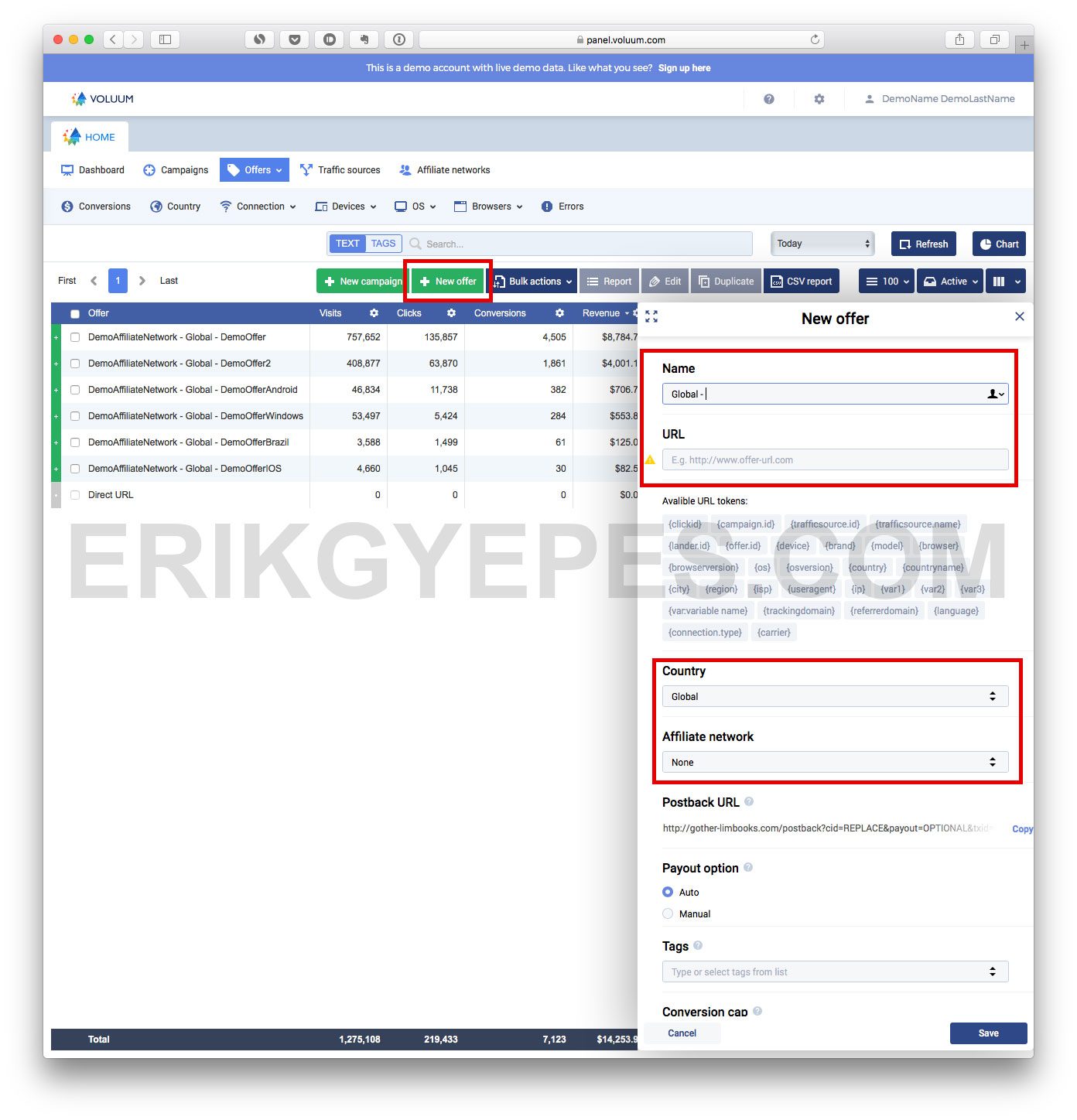
How to add landing pages
Here is how you add a new landing page in Voluum:
- Navigate to the Flows -> Landers tab.
- Click on the “New lander” button.
- Enter a descriptive name for your landing page.
- Enter your landing page URL + add your tokens (as explained above in the tokens section).
- Choose your campaign’s country.
- Additionally, you can also add tags, but it’s not necessary.
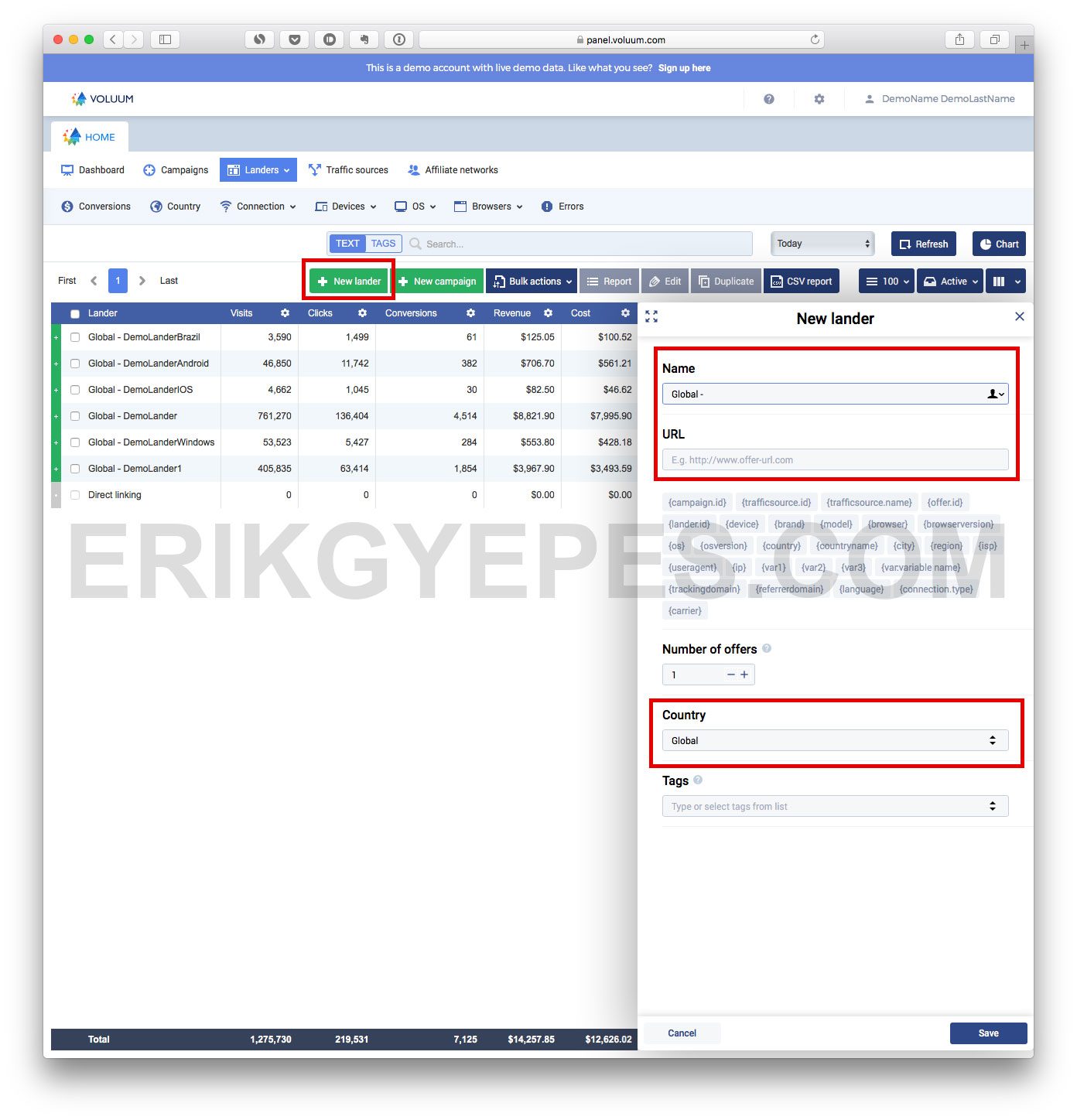
Set up your first campaign
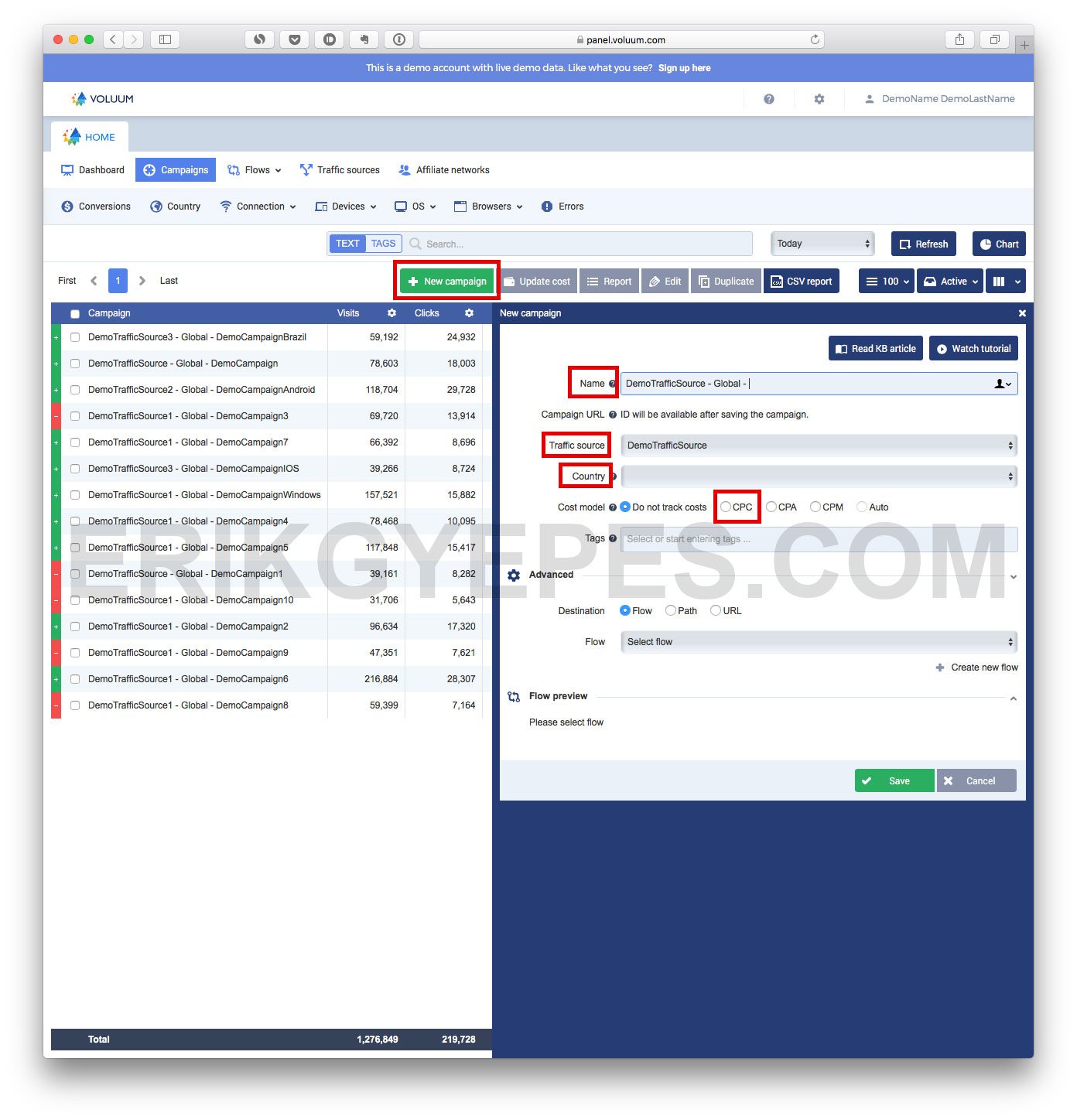
You finally made it to the most exciting step: creating your first campaign in Voluum!
Here is how you create a new campaign in Voluum:
- Navigate to the Campaigns tab.
- Click on “New campaign”.
- Enter your campaign name.
- Select your traffic source.
- Select country.
- Set the cost model to CPC and enter how much you pay for 1 visit/click (in case you pay for traffic in CPM, you have to divide that value by 1000, i.e. $5 CPM = 0.005 CPC).
- In the advanced settings, choose Path and select your landing page and offer combination. If you don’t want to use a landing page, check the “Direct linking” box.
- Click “Save”.
Wrap up
And that’s it.
At this point, you should have a better understanding of how tracking and trackers work and you should be able to set up everything by yourself.
It may look complicated at first, and you will probably need to come back and reread the steps, but after launching a few campaigns, you will know Voluum like the back of your hand.
Let me know in the comments if you have any more questions! I want this guide to be the best around, so I will keep updating it over time.
If you find this post useful, please consider sharing it with your fellow affiliates. It took me many hours to write and verify all the information and steps.
Thank you so much guys!
]]>